Zebra Workcloud Sync
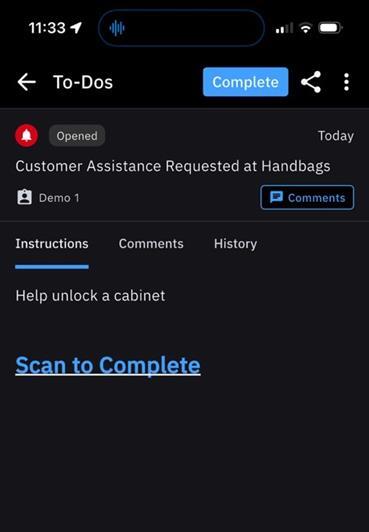
SYNQ supports Zebra Workcloud Sync as a communication platform provider. This means that all staff-facing notifications generated by SYNQ will be delivered to configurable Workcloud Sync groups as To-Dos.
To configure SYNQ to use Zebra Workcloud Sync for your store location you need to:
- Install the Zebra Workcloud Sync app on your devices.
- Determine the Zebra Workcloud Sync groups that represent groups of workers that should receive notifications.
- Configure SYNQ to be aware of your Zebra Workcloud Sync instance channels.
- Configure SYNQ apps and devices to send their notifications to your Zebra Workcloud Sync groups.
Once configured, SYNQ Frontline Hero delivers customer requests from call buttons, QRs, and OrderUp orders to your staff as To-Dos in Workcloud Sync.
Supported Modules
Zebra Workcloud Sync is supported for the following SYNQ modules:
- Call for Help
- OrderUp
- Radio
Requirements
The following information is required to integrate Workcloud Sync with SYNQ Frontline Hero:
- Workcloud Sync API client credentials.
- Workcloud Sync Roles that represent the Workcloud Sync user groups that should receive notifications.
Configuration
SYNQ Frontline Hero requires Zebra Workcloud Sync API client credentials.
To obtain Zebra Workcloud Sync API client credentials:
- Login to the Zebra Workcloud Admin Portal
- For example, https://prod-ui-zwsusprod01p.pp.zebra.com/
- Expand System Configuration.
- Select Device Provisioning.
- Note the Tenant ID.
- Note the Tenant URL.
- Note the instance name within the URL. For example,
zwsusprod01.
- Note the instance name within the URL. For example,
- Select Client Credentials.
- Click Add New Client.
- Provide the following:
- Client Friendly Name:
SYNQ Service Account - Client Validity:
Type: Forever - Token Validity:
Type: Hours24 Hours - Assign Role(s): Select an existing role that includes the following Workcloud Sync permission:
- To-Dos:
- Base
- Task-creation
- Task-creation-checklist
- Task-creation-instore
- Task-reassign
- To-Dos:
- Assign Site: Select the existing site that the users are assigned to.
- Client Friendly Name:
- Click Add.
To provide Frontline Hero with the Zebra Workcloud Sync API client credentials:
- Sign into MyStore as a Location Administrator
- Select Configure Store
- Scroll down to Bot configuration + Channels
- Set Notification Method to
Zebra Workcloud Bot - Provide the following from the Zebra Workcloud Admin Portal:
- Zebra Workcloud Client ID
- Zebra Workcloud Client Secret
- Zebra Workcloud Tenant ID
- Zebra Workcloud Instance
- For example,
zwsusprod01, orzwseuprod01.
- For example,
To define a target Zebra Workcloud Sync group that should receive Frontline Hero notifications:
- Click the Add Bot Instance button.
- Provide the following:
- Site: The name of the Workcloud Sync Site that contains your target users.
- Department: The ID of the Workcloud Sync Department that contains your target users.
- Role: The name of the Workcloud Sync Role that contains the users that should receive notifications.
- Target Name: A name for this group of users. This is how the group will appear elsewhere in MyStore when you are selecting which group will receive notifications.
- Click Save.
- Repeat to add other groups.